Friday, 5 December 2014

AppMgr Pro III (App 2 SD) v3.46 APK


AppMgr (also known as App 2 SD) is a totally new design app that provides the following components:
Move apps: helps you to move apps to either internal or external storage for getting more available app storage
Hide apps: enables you hide system (built-in) apps from the app drawer
App manager: helps you to manage apps for batch uninstalling, moving apps or sharing apps with friends
Over 17,000,000 Downloads!

Features:

  • new ICS style UI, themes
  • batch uninstall apps
  • batch move apps to external storage
  • notify when movable apps installed
  • hide apps from app drawer
  • 1-tap to clear all cache
  • batch clear apps cache or data
  • batch view apps on Google Play
  • export the app list
  • install apps from the exported app list
  • quick uninstall or move an app by drag-n-drop
  • sort apps by name, size or installation time
  • share customized app list with friends
  • support home screen widgets
  • support Android 2/3/4
  • support "Move2SD Enabler"
  • customizable notification sound, vibrate and light

Move apps:

Are you running out of application storage? Do you hate having to check each and every app if it supports moving to the SD card? Do you want an app that automatically does this for you and can notify you when an app can be moved? This component streamlines the movement of apps to on your device's external or internal storage through your device's Settings. With this, you'll have more control over your ever expanding collection of apps. This is crucial to anyone who has memory management issues.

Hide apps:

You don't care for all the apps your carrier adds to Android? Well, now you can get rid of them!This component enables you to hide system (built-in) apps from the app drawer.

We have been selected as a Google I/O 2011 Developer Sandbox partner, for its innovative design and advanced technology.

Note:

  • Move apps function may not work on your devcie as manufacture removes the function of moving apps to SD from Android system
  • Due to the limitation of Android, the hide apps function can only be supported by Android 4+
  • Read user's manual or FAQ by going to: AppMgr > Settings > About

What's new in this Updated version :  Nov 10, 2014

  • fixed crash problem for Android 4.1
  • fixed: show 0 bytes size for apps
  • fixed crash problem on some devices
  • new "Ignore apps with tiny cache" setting option. The default value is checked on Android 4.2+ devices
  • change the default value of "Clean cache notification" option to off
  • bugs fixed and optimizations


UPDATED on : Nov 10, 2014

Required Android : 2.2 and up.

Version : v3.46


DataFileHost:

Smart Launcher Pro 2 v2.12-p1 APK


Smart Launcher is an innovative launcher characterized by a minimalist design, low memory usage and an user-friendly UI that let you start any application with a few taps.
It is currently the only launcher on the store to features automatic cataloging of installed apps!

Features:

  • Main screen with Quick Start
  • Drawer organized by categories
  • Ready to use without special configurations.
  • Support for Live Wallpaper and screens of different sizes.
  • Support of set of icons for Launcher Pro and ADW Launcher
  • What's in this version : (Updated : Dec 4, 2014)
  • Fixed backup bug on Lollipop
  • Fixed missing lockscreen after reboot
  • New folder layout
  • Now you can reorder items in folder (only android > 4)
  • New preferences "App animation" in Preferences → Animations (6 animations available). Previous versions
  • SDK updated to Lollipop;
  • Bugfixes;


UPDATED on : Dec 04, 2014

Required Android : 2.1 and up.

Version : v2.12-p1

Download Links :

Google Play Apk Link

DataFileHost:
Smart Launcher Pro 2 v2.12-p1 APK


Thursday, 4 December 2014

OfficeSuite 8 Pro + PDF And Fonts v8.0.2444 APK


Made by MobiSystems, OfficeSuite Pro allows you to view, create, edit, print and share Word, Excel and PowerPoint files on the go. You can also open attachments and see PDF files on an Android based phone or tablet with our feature-rich mobile office solution.

OfficeSuite Pro includes a File Browser and integration with Cloud service leaders: Box, DropBox, Google Drive, SkyDrive and SugarSync to give users a multitude of options on how to manage files and attachments.

OfficeSuite Pro 7 Out Now! New Features:

  • New and improved UI
  • Side bar navigation in the File Browser for quick access to different folders and remote third party cloud services
  • Templates - OfficeSuite Pro 7 users can benefit from a wide range of templates, from Resume and Invoice templates to Travel Planner and Weight Loss Tracker templates, among others
  • Extended Cloud support - now compatible with Microsoft SkyDrive. Google Drive support has been improved, by adding folder support, thus allowing for optimized document view

Docs Editor:

  • Styles - apply MS Word styles or styles used in the document
  • Table design – ability to fashion an inserted table as per our library of tailor-made designs
  • Formulas (display only)
  • Format painter

Spreadsheet Editor:

  • Improved selection of parameters in functions
  • Slides Editor:
  • Animations

PDF Viewing:

  • A new PDF engine using library from Adobe, providing instant opening of large PDF files
  •  Find/Find Next

File Formats Supported:

  • Text format - DOC, DOCX, DOCM, RTF, TXT, LOG
  • Spreadsheet - XLS, XLSX, XLSM, CSV
  • Presentation - PPT, PPTX, PPS, PPSX, PPTM, PPSM
  • Other formats - PDF, EML, ZIP

Easy File Access and Sharing:

  • With the integrated File Browser you can easily access, modify and share your local or Cloud stored files. OfficeSuite integrates with Google Drive, DropBox, Box, SugarSync and SkyDrive
  • Easily open email attachments
  • Work with Outlook EML files
  • Share documents via Email or Bluetooth

Intuitive and Intelligent Design:

  • OfficeSuite 7 comes with new intuitive design and user experience allowing quick and intuitive workflow while you manage your files or create and modify documents.
  • New side bar gives instant access to local and cloud stored files.
  • Two-finger zoom, multi-touch support, context toolbars and popup menus make your work with OfficeSuite quick and fun.

OfficeSuite Extensions:

  • QuickSpell – fully integrated with OfficeSuite Pro QuickSpell will help you dramatically improve your typing accuracy.
  • Font Pack – allows you to use Microsoft most used fonts in OfficeSuite text documents.
  • Note that OfficeSuite Extensions are sold separately. Purchasing any of the extensions is optional.

Compatible with Sony Ericsson LiveDock™ Multimedia station.

What's new in this Updated version : (Nov 25, 2014)

  • Amazon Cloud Drive support
  • New font spinner for managing and adding fonts in Word and PowerPoint
  • Desktop-inspired user interface and experience
  • Word module:
  • Track changes
  • Document author support
  • Comments visualized as balloons
  • Excel module - additional font support
  • PowerPoint module - text formatting
  • PDF module:
  • Permissions management: user password, owner password, printing and annotations
  • Digital signatures and signature profiles


UPDATED on : Dec 04, 2014

Required Android : 1.6 and up.

Version :  v8.0.2444


DataFileHost:

Wednesday, 3 December 2014

How To Reset the Screen Unlock Pattern of Any Sony Xperia Phone

Hi Guys Welcome After Long Time...

Today i Will Show You How  To Reset the Screen Unlock Pattern of Any Sony Xperia Phone.


I Will Show You Easy 2 steps to unlock Pattern of Any Sony Xperia Phone.

As You All Know If the incorrect screen unlock pattern is entered five times in a row, the phone is locked.

Step 1:

Note: In order to reset the screen unlock pattern you need to have a registered Google™ account on your phone. If you don’t have a registered Google™ account on your phone, you must repair the phone software before tapping Forgot pattern.

To reset the screen unlock pattern by answering a security question:

If entering the incorrect screen unlock pattern five times, wait for 30 seconds and then tap Forgot pattern?.
Tap Answer question > Next.
Enter the answer for the security question.
Tap Unlock.
To reset the screen unlock pattern by entering Google account details:

Tap Enter Google accounts details > Next.
Tap the Username field and enter the phone registered Google™ account username.
Tap the Password field and enter the phone registered Google™ account password.
Tap Unlock.

Step 2:

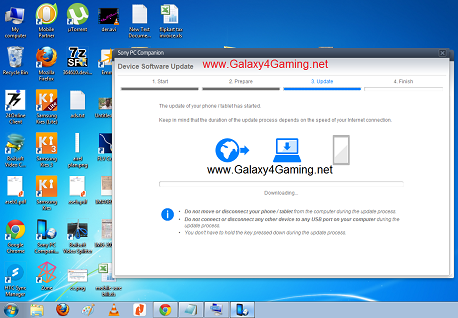
To repair the phone software by computer: 

Install PC Companion 2.0 or up & Open : 

Go In the Support Zone application, click Start > Repair and follow the instructions on the screen.


Note: The installed software on your phone will be replaced, and all personal data stored will be lost.

Download : PC Companion 2.0.exe

Sunday, 31 August 2014

Subway Surfers Beijing 1.28.0 MOD APK (Unlimited Coins/Keys)


DASH as fast as you can! 
DODGE the oncoming trains!

What's New in This version:

★ Follow the Subway Surfers World Tour to mystical China
★ Pace through the Subway of Beijing with acrobatic Sun
★ Add powerful Board Upgrades to selected boards
★ Reach for the challenging new Coin Cautious Awards
★ Search the tracks for hidden dragons to unlock weekly prizes


 UPDATED on : Aug 29, 2014

Required Android : 2.2 and up.

Version : 1.28.0

Download Links :

Google Play Apk Link

DataFileHost:
Subway Surfers Beijing 1.28.0 MOD APK

ZippyShare:
Subway Surfers Beijing 1.28.0 MOD APK

Sunday, 23 March 2014

Guide to Root Micromax Canvas 2 A110 and Install CWM Recovery

Looking to root A110 Micromax Canvas 2? Here our step by step guide to help you Root Micromax Canvas 2 A110 on Jelly Bean and install CWM Recovery on it.


Recently Micromax released official Jelly Bean update for its famous Canvas 2 A110 smartphone and soon after the update was released, almost 90% of Canvas A110 owners updated their smartphones to latest firmware. Since updating firmware revokes the root status, so we decided to cover tutorial on root Micromax Canvas 2 A110 on Android 4.2 Jelly Bean. Rooting device on Android Jelly Bean is little harder than rooting on ICS since ICS requires only Bin4ry rooting kit and one need to extract that to get his mobile or tablet rooted.


Micromax Canvas 2 A110 has gained a lot of popularity among users because of its amazing hardware specs and features. Meanwhile the phone comes with a very reasonable price tag which is nothing when compared with its features. Here our guide to Root Micromax Canvas 2 A110 and install CWM Recovery on it.


Please keep in mind that rooting your Canvas 2 A110 will void its warranty mean you will no longer be able to claim its warranty. So do it at your own risk, we cannot be held responsible if you end up bricking your phone.


If you know what exactly you are going to do with your Canvas 2 A110, then you can safely proceed with our guide to Root Micromax Canvas 2 A110 and install CWM Recovery on it.


Pre-Requirements 

First of all you need to have your mobile phone charged. It should have atleast 80% charge remaining.
Enable USB Debugging on your phone from Settings –> Manage Applications –> Development –> USB Debugging.
The most important one: Back up all your important data like contacts, SMS, emails etc.
Download the latest USB Drivers for your Android Device from manufacturer official website.
Complete Procedure to Root Micromax Canvas 2 A110 and Install CWM Recovery


There are two big steps to get the desired results. First you need to flash and install CWM Recovery on Micromax Canvas 2 A110 followed by rooting it.
Install CWM Recovery on Micromax Canvas 2 A110


First of all download Canvas 2 A110 Rooting Kit and extract it to your desktop. After extracting it you will see two folders named SP_FLASH_TOOL and other. Open SP_FLASH_TOOL folder and click on blue tool icon to launch it.


A new window will open. Click on “Scatter-loading” button and it will open a browse for popup. Simply browse the second folder the select Mt6577_Android_scatter_emmc file.


Now turn Off your smartphone and connect it to your computer through USB cable. Wait for about few seconds and then disconnect it from your PC and take the battery out of your phone.


Click on Download button in that flash too window to begin the count process. Once it is started, connect your phone to your computer. Now you will see a green ring on the screen which shows that flash tool has started the flashing process.


Once the flashing is done, you can safely disconnect your phone from your PC. Now you have successfully installed CWM Recovery on your Micromax Canvas 2 A110. Next you are ready to root it.
Root Micromax Canvas 2 A110


Turn on your phone and connect it your computer. Next open the scatter+recovery+su folder and check for the zip file named “UPDATE-SuperSU-v1.04” and transfer it to your SD card.


Now switch off your mobile phone and then boot it into recovery mode. For that press “Power + Volume U + Volume Down” buttons together to boot it to recovery mode.


In recovery mode select “Install zip from sd card” and browse for UPDATE-SuperSU-v1.04 file. Confirm in popup box to start flashing process. Once flashing is done, reboot your phone.


That’s is done. You have successfully rooted your Micromax Canvas 2 A110 and installed CWM Recovery on it. Now you are free to install custom ROM and apps on your phone.


Downloads :

Canvas 2 A110 Rooting Kit

Xtreme Rejoice Kernel


Hi to all!

Check for new kernel for Micromax A110 and same spec devices (MT6577).

Not a long description here.

New Changelog for Xtreme-Rejoice:
1. interactive, conservative, hybrid, ondemand, powersave, performance, CPU governors added.

2. noop, deadline, cfq I/O scheduler added.
3. Changed LMK values for internal task manager means more free memory.
4. Changed to hybrid and cfq as default CPU governor and I/O scheduler (4.2.x).
5. Changed to hybrid and cfq as default CPU governor and I/O scheduler (4.1.x).
6. NTFS OTG support added (NEW).
7. init.d support added.
8. Battery saver and performance MODs added.
9. Compressed with lmza means less size means more performance and less time to boot and more battery juice.
10. Compiled with linaro's latest toolchain.
11. xz compression enabled.
12. Network/WiFi speed and connectivity improved.
13. Dynamic Readahead calculation.
14. All cores working on loaded with heavy process (hotplugging).
15. Dynamic vfs for more battery saving.
16. Camera capture quality improved.
17. Improved Multitasking.
18. Dynamic cache included (Thanks to faux123).
19. Optimized and dynamic lowmemorykiller (Christopher83).
20. Upstream to 3.4.82.
21. Fixed conservative CPU Frequency Governor for Performance and battery.
22. Uncapped FPS to 60.
23. Improved RAM Consumption by various components.
24. Logger size decreased for more free RAM.
25. Fixed deadline I/O scheduler for improved read and writes.
26. Fixed Derps in Network files.
27. Improved CIFS for faster access.
28. Fixed ondemand CPU governor for more battery saving.
29. Special Performance Optimizations done for more buttery feel.
30. App installating smoothly.
31. Tweaked sio I/O scheduler.
32. Tweaked Android logger.
33. Tweaked OOM.
35. Tweaked Pegasusq for more performance.
36. Tweaked conservativex for more battery.
37. Battery MOD included for the best battery backup ever.
38. More intelligent screen on/off dirty cache cleaning.
39. Improved kernel process management.
40. Main focus for getting more free RAM.
41. ARM CPU Alignment on boot.
42. ARM Auto Hotplugging.
43. Dynamic OOM killer values calculation.
44. Buttery smooth.
45. lmk_fast support added to LMK.
46. Now Camera working for JB-out-of-the-box handsets (Testing).

Kindly don't use any scripts or MODS for increasing performance or battery or you may face any problem. If you do then I would laugh instead of helping.

Disclaimer:
I am not responsible for any kind of mess you do with your device after flashing this kernel and don't complain any, if done.

Downloads: 

For 4.2.x - Xtreme-Rejoice-4.2.x-3.4.82

For 4.1.x - Xtreme-Rejoice-4.1.x-3.4.82